0 ratings

Item #:
147242521
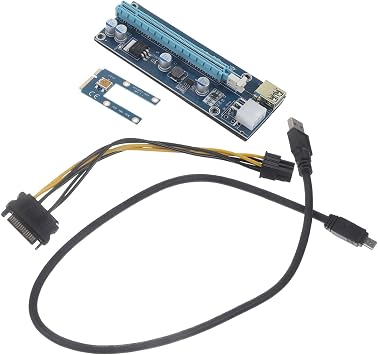
Mikikit Pcie Mining Graphics Card Adapter USB Cable for External Gpu Connection Compatible Laptop Pci Pci Efficient Performance Upgrade
Item #:
147242521
HNL 643
Price Details
Excluding Shipping & Custom charges ( Shipping and custom charges will be calculated on checkout )
*All items will import from US
0 ratings
Write a review
In stock
 Imported from USA store
QTY:
Order now and get it around Sunday, August 30
Secured transaction
Ubuy works hard to protect your security and privacy. Our advanced payment security system ensures confidentiality by encrypting your information during transmission using AES (Advanced Encryption Standards) and SSL (Secure Socket Layer) protocols. Your payment details are 100% secure as we do not share your payment details with third party sellers.
Our Top Logistics Partners


Upgrade your 's graphics processing power and take your multimedia experience to the next level with this graphics card adapter.

Fast
Shipping

Free
Return*

Secure Packaging

100% Original Products

PCI DSS Compliance

ISO 27001 Certified


What Stands Out
Enhanced Compatibility
Designed for seamless connection with laptops and external GPUs, this adapter ensures broad compatibility, maximizing performance without the need for complex installations or extensive hardware modifications.
Efficient Performance
Optimized for PCIe mining, this adapter elevates graphical performance, ideal for gamers and miners alike, providing a significant upgrade for those seeking to enhance their workstation's capabilities.
Easy Installation
Featuring a user-friendly design, the Mikikit adapter simplifies the setup process with plug-and-play functionality, making it accessible for both beginners and seasoned users without technical expertise.
Product Details
| Item Weight | 0.5 lbs (230 grams) |
Who Should Buy?

-
Laptop Gamers
Users looking to enhance their laptop gaming performance with an external GPU for improved graphics and frame rates.
-
Crypto Miners
Cryptocurrency miners who want to connect external GPUs to laptops for enhanced mining efficiency and performance.
-
Tech Enthusiasts
Individuals interested in building custom setups or upgrading existing systems with better GPU capabilities using laptops.

-
Casual Users
Everyday users who do not need enhanced graphics performance may find this product unnecessary and redundant.
Product Description
Mikikit Pcie Mining Graphics Card Adapter USB Cable for External Gpu Connection Compatible Laptop Pci Pci Efficient Performance Upgrade
Have any Query? Chat with us
Customer Questions & Answers
-
Question:
What is the Mikikit PCIe Mining Graphics Card Adapter USB Cable?
Answer: The Mikikit PCIe Mining Graphics Card Adapter USB Cable is a specialized product designed to connect an external graphics processing unit (GPU) to a laptop via the PCI Express interface. This cable allows users to upgrade their laptop's performance by utilizing a powerful external GPU, enabling enhanced graphics processing for gaming, design, and mining tasks. The USB interface offers flexibility, allowing users to set up their external GPU system efficiently. This setup is especially beneficial for gamers and professionals requiring high-quality graphics or extensive computational power. -
Question:
How does the Mikikit adapter enhance laptop performance?
Answer: The Mikikit adapter enhances laptop performance by allowing the integration of high-performance external GPUs that can significantly improve graphics rendering and computational capabilities. By offloading rendering tasks from the laptop’s integrated graphics to the external GPU, users experience faster frame rates in games, improved graphics in applications, and better performance in intensive tasks like 3D modeling or cryptocurrency mining. This means smoother gameplay, quicker rendering times, and the possibility of using more demanding software without being limited by the laptop's internal specs. -
Question:
Is the Mikikit PCIe cable compatible with all laptops?
Answer: Not all laptops are compatible with the Mikikit PCIe cable; compatibility primarily depends on the laptop's design and support for PCI Express ports. Generally, laptops with a Thunderbolt 3 or USB-C port will have a higher chance of compatible connection. It's crucial to check your laptop's specifications and confirm it supports external GPU functions to utilize this adapter effectively. If unsure, consulting the laptop’s manual or the manufacturer’s website can provide clarity regarding compatibility with PCIe connections. -
Question:
Can I use the Mikikit PCIe adapter for gaming purposes?
Answer: Yes, the Mikikit PCIe adapter is ideal for gaming purposes. By connecting an external GPU, gamers can experience higher graphics quality, improved frame rates, and reduced lag in gameplay. This setup is particularly useful for those with laptops that struggle to run modern games due to insufficient internal graphics capabilities. Using this adapter allows for a more powerful gaming experience as it unlocks the potential of advanced GPUs, making it feasible to enjoy the latest titles in high settings without sacrificing performance. -
Question:
What types of GPUs are compatible with the Mikikit PCIe adapter?
Answer: The Mikikit PCIe adapter is compatible with a wide range of GPUs from leading manufacturers like NVIDIA and AMD. It is crucial to select a GPU that fits the adapter’s specifications and offers a supported power requirement. Common choices include the NVIDIA GeForce RTX series and AMD Radeon RX series, known for reliable performance in gaming and professional applications. Users should also consider the physical size of the GPU and ensure it fits properly within their external case while being mindful of its cooling needs for optimal functionality. -
Question:
How do I set up the Mikikit PCIe adapter with my laptop?
Answer: Setting up the Mikikit PCIe adapter involves a few clear steps: First, securely connect the external GPU to the adapter using the appropriate PCIe slot. Next, attach the adapter to your laptop via the designated USB or Thunderbolt port. Finally, install any necessary drivers for the external GPU to ensure it's recognized by your operating system. After setup, users may need to adjust the graphics settings in their preferred applications to optimize performance effectively. This setup provides a significant boost in graphics capabilities, tailored specifically for the laptop’s needs. -
Question:
What advantages does USB connectivity offer for the Mikikit adapter?
Answer: The USB connectivity of the Mikikit adapter offers several advantages, including portability and ease of use. Unlike traditional internal GPU setups, this allows for a quick plug-and-play experience with minimal hassle. Users can easily connect and disconnect the external GPU without needing extensive technical knowledge or modifications to their laptops. Additionally, USB connections often support high data transfer rates, ensuring that the external GPU performs efficiently for gaming or demanding applications, making it a practical choice for users seeking performance upgrades. -
Question:
Can I use the Mikikit adapter for cryptocurrency mining?
Answer: Yes, the Mikikit adapter is suitable for cryptocurrency mining, particularly when paired with a capable external GPU. Miners benefit from the increased processing power available from high-performance GPUs, which can significantly enhance mining efficiency. When set up correctly, this adapter allows laptops to leverage external graphics capabilities, making it feasible to participate in mining activities without solely relying on integrated graphics. It’s essential to ensure that your system is adequately cooled and powered to handle the demands of mining operations effectively. -
Question:
Where can I buy the Mikikit PCIe Mining Graphics Card Adapter USB Cable?
Answer: You can purchase the Mikikit PCIe Mining Graphics Card Adapter USB Cable at Ubuy. Ubuy offers a convenient platform for acquiring this essential accessory, providing a wide selection of products and efficient service tailored to your needs. Being a trusted online retailer, Ubuy presents various options and competitive offerings, making it easy for you to find the Mikikit adapter and enhance your laptop's performance.
Mikikit Graphics Cards Editorial Review
No editorial reviews found
Customer Reviews & Ratings
1 customers ratings
-
5 Star
100%
-
4 Star
0%
-
3 Star
0%
-
2 Star
0%
-
1 Star
0%
Review this product
Share your thoughts with other customers
Platform Trust & Buyer Confidence

MA
Mohammad
Verified buyer
“Excellent quality and original too,when ubuy send original things I will appreciate that ,I very satisfied thank you”
23 July 2026 · via Trustpilot
CK
Chitra
Verified buyer
“The order and delivery progress was communicated very well. Package arrived within the estimated time. Products arrived as expected in good condition.”
22-Jul-26 · via Trustpilot
K
kund
Verified buyer
“Good supply of products. Safe payment methods, and shipment worldwide! Genuine products.”
23-Jul-26 · via Trustpilot
OO
Onesi
Verified buyer
“Was my first time buying a product from Ubuy, but I found it so helpful. This is reliable. Gonna place a new order!”
22 July 2026 · via Trustpilot
SJ
SAO JOHN
Verified buyer
“Ubuy is a great online platform to buy stuff. Reliable, fast delivery time and great value for money. I've been using Ubuy online shopping platform for three years now and will continue to do so.”
23 July 2026 · via Trustpilot
Secure Checkout
Global Delivery
Easy Returns
Genuine Products
Product Price History
Important information
- Limitations : For products shipped internationally, please note that any manufacturer warranty may not be valid; manufacturer service options may not be available; product manuals, instructions, and safety warnings may not be in destination country languages; the products (and accompanying materials) may not be designed in accordance with destination country standards, specifications, and labeling requirements; and the products may not conform to destination country voltage and other electrical standards (requiring use of an adapter or converter if appropriate). The recipient is responsible for assuring that the product can be lawfully imported to the destination country. When ordering from Ubuy or its affiliates, the recipient is the importer of record and must comply with all laws and regulations of the destination country.
- Not all the products listed on Ubuy are for sale, as Ubuy is a global search engine. Products are subject to export/trade regulations.
HNL 643
Order now and get it around Sunday, August 30
This item is not restrict in my country.(Please click on above link if this item is not restrict in your country, So our team will review and allow.)
QTY:
Secured transaction
PCI DSS compliant and ISO 27001:2022 certified, with encrypted payments and full buyer protection on every order.
Our Top Logistics Partners
Fastest cross-border delivery
Features & Benefits
- Enhances graphics processing power for improved performance.
- Simple solution for connecting external displays and devices.
- Offers multiple connectivity options for versatility.
- Ideal for gamers and multimedia enthusiasts.
- Easy-to-use design for seamless integration.
- Upgrade your visual experience with immersive effects.
Ubuy Assurance
Experience worry-free shopping with 100% original products, PCI DSS-compliant payment security, ISO 27001-certified data protection, the fastest cross-border delivery, free returns *, and secure packaging on every order.