0 ratings


Nº de artículo:
94146143
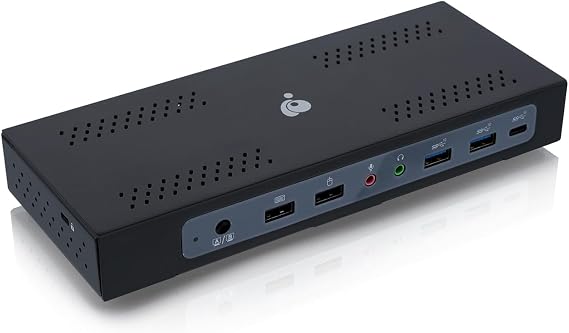
IOGEAR Dock PRO Duo USB Type-C Docking Station
78% of respondents would recommend this to a friend
Nº de artículo:
94146143
HNL 7604
Price Details
Excluding Shipping & Custom charges ( Shipping and custom charges will be calculated on checkout )
*All items will import from Estados Unidos
0 ratings
Escribe una opinión
En stock
 Importado de la tienda USA
QTY:
Haz tu pedido ahora y recíbelo por ahí Jueves, Septiembre 24
Secured transaction
Ubuy works hard to protect your security and privacy. Our advanced payment security system ensures confidentiality by encrypting your information during transmission using AES (Advanced Encryption Standards) and SSL (Secure Socket Layer) protocols. Your payment details are 100% secure as we do not share your payment details with third party sellers.
Our Top Logistics Partners


Share video and USB peripherals between 2 USB-C host computers while powering both with up to 100W each.

Fast
Shipping

Free
Return*

Secure Packaging

100% Original Products

PCI DSS Compliance

ISO 27001 Certified



What Stands Out
Dual Display Support
Seamlessly connect two external monitors with 4K resolution, enhancing productivity for multi-taskers and professionals needing expansive digital workspace.
Wide Compatibility
TAA compliance ensures compatibility with government and corporate environments, making it the ideal choice for businesses that require reliable and approved technology solutions.
Versatile Connectivity
Features multiple USB ports and HDMI outputs, providing extensive connectivity options for various devices, thus addressing diverse user needs for streamlined operations.
Detalles de producto
| Hardware Interface | USB |
| Compatible Devices | USB-C compatible laptops, smartphones, tablets, and other handheld devices running on Windows and Mac OS platforms |
| Total Usb Ports | 7 |
| Number of Ports | 2 |
| Total Number of HDMI Ports | 1 |
| Wattage | 230 watts |
| Item Dimensions L x W x H | 11.8"L x 13.7"W x 12.5"H (30 x 34.8 x 31.8 cm) |
| Item Weight | 1.5 pounds (680 grams) |
| Color | HDMI/DisplayPort - TAA |
| Brand | IOGEAR |
| Number of Items | 1 |
| Global Trade Identification Number | 00881317521682 |
| Unit Count | 1 Count |
| UPC | 881317521682 |
| Manufacturer | IOGEAR |
| Built-In Media | Item |
| Model Number | GUD3CDHTAA |
| Mfr Part Number | GUD3CDHTAA |
| Compatible Devices | USB-C compatible laptops, smartphones, tablets, and other handheld devices running on Windows and Mac OS platforms See more |
| Total USB Ports | 7 |
| Product Dimensions (L x W x H) | 11.8"L x 13.7"W x 12.5"H (30 x 34.8 x 31.8 cm) |
| Total HDMI Ports | 1 |
Who Should Buy?

-
Remote Workers
Ideal for remote professionals needing multiple USB ports and display outputs for efficient home office setups.
-
Tech Enthusiasts
Great for users who require versatile connectivity options for various devices and peripherals simultaneously.
-
Business Use
Suitable for businesses requiring TAA compliance for government contracts, ensuring compatibility with specific regulations.

-
Casual Users
Casual users may find advanced features excessive and may prefer simpler solutions for basic connectivity needs.
DESCRIPCIÓN DEL PRODUCTO
IOGEAR Dock PRO Duo USB Type-C Docking Station
¿Tienes alguna consulta? Chatea con nosotros
Preguntas y respuestas de los clientes
-
Pregunta:
What devices are compatible with the IOGEAR Dock Pro Duo USB-C Docking Station?
Respuesta: The IOGEAR Dock Pro Duo is compatible with a wide range of USB-C enabled devices, including laptops, tablets, and smartphones. This versatility is particularly useful in office environments where varied devices are in use. Users can easily connect their devices for seamless data transfer and charging. For instance, if you have a MacBook and a Samsung Galaxy phone, this docking station can simultaneously support both, making it a convenient hub for multiple devices. -
Pregunta:
How many ports does the IOGEAR Dock Pro Duo possess?
Respuesta: The IOGEAR Dock Pro Duo is equipped with multiple ports including USB-C, USB-A, HDMI, and Ethernet. This diverse selection allows users to connect various peripherals like monitors, keyboards, mice, and network devices. For example, you can connect an external monitor via HDMI while linking a keyboard and mouse through USB-A ports, creating an efficient workstation setup. This makes it ideal for remote working or multitasking. -
Pregunta:
Is the IOGEAR Dock Pro Duo suitable for dual display setups?
Respuesta: Yes, the IOGEAR Dock Pro Duo supports dual display setups through its HDMI ports. This feature enables you to extend your workstation by connecting two monitors, enhancing productivity by allowing you to multitask effectively. For instance, you can have your main work application open on one screen while keeping communications or research visible on the other. This setup is particularly beneficial for professionals who need more screen real estate. -
Pregunta:
Does the IOGEAR Dock Pro Duo support power delivery?
Respuesta: Absolutely! The IOGEAR Dock Pro Duo supports power delivery, allowing you to charge your laptop while simultaneously using its ports. This eliminates the need for multiple chargers and reduces cable clutter. For example, if you’re working on your laptop at home, you can use the dock to keep it charged while connecting to external devices—ensuring your productivity remains uninterrupted. -
Pregunta:
Can the IOGEAR Dock Pro Duo be used with older USB devices?
Respuesta: Yes, the dock includes USB-A ports, so you can connect older USB devices seamlessly. This backwards compatibility is crucial for users who have legacy devices like printers, external hard drives, or older peripherals. For instance, if you have an external hard drive that uses a standard USB connection, you can connect it directly to the dock, ensuring you can access all your important files without any hassle. -
Pregunta:
Is the IOGEAR Dock Pro Duo portable?
Respuesta: The IOGEAR Dock Pro Duo is designed for portability, making it easy to transport between home and office. Its compact size and lightweight build allow users to pack it in their laptop bags effortlessly. For individuals frequently on the move, such as business professionals and students, being able to set up their workspace quickly wherever they are can greatly enhance productivity. -
Pregunta:
What makes the IOGEAR Dock Pro Duo TAA compliant?
Respuesta: The IOGEAR Dock Pro Duo is TAA compliant, meaning it meets the Trade Agreements Act requirements for federal procurement. This is essential for government and corporate buyers who need assurance that their technology meets specific regulatory standards. Accordingly, organizations can confidently integrate this dock into their IT infrastructure without compliance worries. -
Pregunta:
Is it possible to update the firmware of the IOGEAR Dock Pro Duo?
Respuesta: Yes, the IOGEAR Dock Pro Duo allows users to update firmware when necessary. Keeping the firmware updated ensures compatibility with the latest devices and operating systems while improving performance. Users can visit the IOGEAR website to find firmware updates and follow straightforward instructions for installation. This feature is particularly useful for keeping the dock functioning optimally over time. -
Pregunta:
What features enhance the IOGEAR Dock Pro Duo’s connectivity?
Respuesta: The IOGEAR Dock Pro Duo features advanced connectivity options including high-speed data transfer through USB 3.0 ports and multiple video output options. These attributes cater to users needing faster performance for tasks like video editing or gaming. For example, if you are sending large files to an external hard drive, the high-speed USB ports will significantly reduce transfer time, optimizing workflow. -
Pregunta:
Where can I buy the IOGEAR Dock Pro Duo USB-C Docking Station TAA Compliant GUD3CDHTAA?
Respuesta: You can buy the IOGEAR Dock Pro Duo USB-C Docking Station TAA Compliant GUD3CDHTAA at Ubuy. Ubuy offers a wide selection of tech products and ensures an efficient online shopping experience, making it your go-to platform for purchasing this docking station.
IOGEAR Docking Stations GUD3CDHTAA Editorial Review
The IOGEAR Dock Pro Duo USB-C Docking Station has garnered a mix of reviews from users with various setups, mainly for its utility in connecting multiple devices and displays. A common theme among reviewers is the dock's capability to seamlessly switch between two laptops, which is especially beneficial for users juggling between work and personal devices. Its efficacy was noted by users who successfully connected a setup featuring three displays, a webcam, and various peripherals like keyboards and mice. One major highlight of the dock is its compatibility with both Windows and macOS systems, allowing for versatile use—in particular, it works well with the MacBook when the DisplayLink software is used, although some users have reported frequent power issues and disconnections when the MacBook lid is closed. On Windows systems, users typically found more straightforward functionality without the need for additional drivers. However, the dock is not without its drawbacks. Some users experienced Considerable display lag, particularly with DisplayPort outputs during gaming, which was a significant concern for those utilizing high-performance laptops like the Razer gaming machine. Switching between different computer configurations also requires a couple of button presses, which might confuse some users, especially because the dock doesn’t have separate port options for each monitor. This has drawn criticism for its limited flexibility in display port management. Overall, the IOGEAR Dock Pro Duo stands out for its design and manageability of multiple devices, but potential buyers should weigh the quirks and issues reported by existing users. There is a strong appreciation for the streamlined connectivity it offers, but quickly addressing compatibility and performance limitations is essential for maximizing the user experience. **
Customer Reviews & Ratings
1 valoraciones de los clientes
-
5 estrella
100%
-
4 estrella
0%
-
3 estrella
0%
-
2 estrella
0%
-
1 estrella
0%
Revisar este producto
Comparte tus ideas con otros clientes
ventajas
- Supports multiple displays with both PC and Mac.
- Efficient laptop switching without the need to plug/unplug cables.
- Full metal housing design feels sturdy and reliable.
- Good compatibility with peripheral devices.
Contras
- Limited port choice for different monitor connections (specific to ports available).
Platform Trust & Buyer Confidence

MA
Mohammad
Verified buyer
“Excellent quality and original too,when ubuy send original things I will appreciate that ,I very satisfied thank you”
23 July 2026 · via Trustpilot
CK
Chitra
Verified buyer
“The order and delivery progress was communicated very well. Package arrived within the estimated time. Products arrived as expected in good condition.”
22-Jul-26 · via Trustpilot
K
kund
Verified buyer
“Good supply of products. Safe payment methods, and shipment worldwide! Genuine products.”
23-Jul-26 · via Trustpilot
OO
Onesi
Verified buyer
“Was my first time buying a product from Ubuy, but I found it so helpful. This is reliable. Gonna place a new order!”
22 July 2026 · via Trustpilot
SJ
SAO JOHN
Verified buyer
“Ubuy is a great online platform to buy stuff. Reliable, fast delivery time and great value for money. I've been using Ubuy online shopping platform for three years now and will continue to do so.”
23 July 2026 · via Trustpilot
Pago seguro
Global Delivery
Easy Returns
Genuine Products
Product Price History
Información importante
- Limitaciones: Para los productos enviados al extranjero, ten en cuenta que cualquier garantía del fabricante puede no ser válida; las opciones de servicio del fabricante pueden no estar disponibles; los manuales del producto, las instrucciones y las advertencias de seguridad pueden no estar en los idiomas del país de destino; los productos (y los materiales que los acompañan) pueden no estar diseñados de acuerdo con las normas, especificaciones y requisitos de etiquetado del país de destino; y los productos pueden no ajustarse al voltaje del país de destino y a otras normas eléctricas (lo que requiere el uso de un adaptador o convertidor, si procede). El destinatario es responsable de asegurarse de que el producto puede ser importado legalmente al país de destino. Cuando hagas un pedido a Ubuy o a sus filiales, el destinatario es el importador registrado y debe cumplir todas las leyes y normativas del país de destino.
- No todos los productos que aparecen en Ubuy están a la venta, ya que Ubuy es un motor de búsqueda a nivel mundial. Los productos están sujetos a las normas de exportación/comercio.
HNL 7604
Haz tu pedido ahora y recíbelo por ahí Jueves, Septiembre 24
This item is not restrict in my country.(Please click on above link if this item is not restrict in your country, So our team will review and allow.)
QTY:
Secured transaction
PCI DSS compliant and ISO 27001:2022 certified, with encrypted payments and full buyer protection on every order.
Our Top Logistics Partners
Fastest cross-border delivery
características y beneficios
- Efficient multitasking: Connect 2 USB-C host computers.
- Supports up to three 4K displays via HDMI and DisplayPort.
- Fast data transfer with 2 USB-A Gen 2 ports at 10 Gbps.
- Provides up to 100W power delivery to each connected computer.
- Compatible with all USB-C computers, including Windows and Mac OS.
- Ideal for high-resolution projects and professional use.
Ubuy Assurance
Experience worry-free shopping with 100% original products, PCI DSS-compliant payment security, ISO 27001-certified data protection, the fastest cross-border delivery, free returns *, and secure packaging on every order.