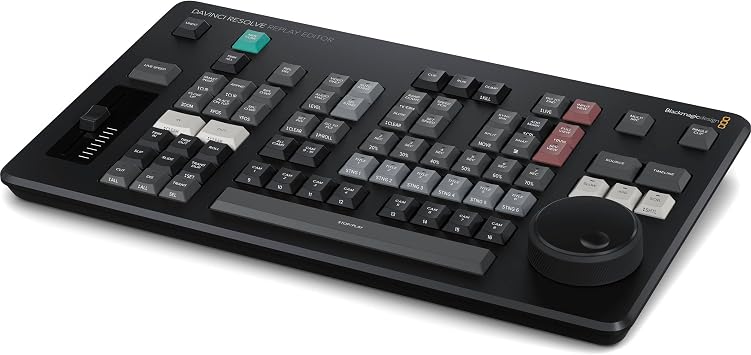
Blackmagic Design Davinci Resolve Replay Editor (DV/RES/BBPNLMLEKAR)
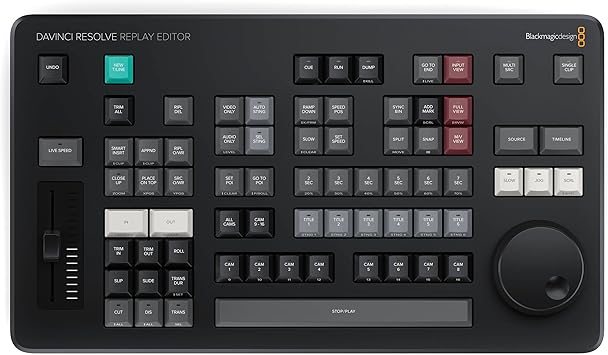
The Blackmagic Design DaVinci Replay Resolve Editor is specifically designed for multi-cam editing, delivering fast and efficient editing for news cutting and live sports replay.
Blackmagic Design Davinci Resolve Replay Editor (DV/RES/BBPNLMLEKAR)
Nº de artículo: 118569320

Blackmagic Design Davinci Resolve Replay Editor (DV/RES/BBPNLMLEKAR)

Nº de artículo: 118569320

HNL 17753

Price Details

Excluding Shipping & Custom charges ( Shipping and custom charges will be calculated on checkout )

*All items will import from Estados Unidos

En stock
Estados Unidos Importado de la tienda USA

QTY:

Solo quedan 2 artículos en stock.
Haz tu pedido ahora y recíbelo por ahí Monday, Agosto 03
Our Top Logistics Partners
  • fedex
  • dhl
The Blackmagic Design DaVinci Replay Resolve Editor is specifically designed for multi-cam editing, delivering fast and efficient editing for news cutting and live sports replay.
Garantía U-Care:
Ninguno
Selecciona un plan
fast shipping

Fast
Shipping

free return

Free
Return*

secure packaging

Secure Packaging

100% original products

100% Original Products

pci-dss

PCI DSS Compliance

iso certified

ISO 27001 Certified


paypal payment
visa payment
mastercard payment

What Stands Out

Multi-Cam Editing
Streamline your workflow with advanced multi-cam editing capabilities, allowing editors to seamlessly switch between multiple camera angles in real-time, perfect for fast-paced news and sports environments.
Live Sports Replay
Enhance viewer engagement with instant replays and highlights, offering editors powerful tools to quickly showcase critical moments during live sports events, ensuring they never miss a beat.
User-Friendly Interface
Designed for ease of use, the intuitive interface empowers professionals to edit efficiently without a steep learning curve, making it ideal for both experienced editors and newcomers in fast-paced scenarios.

Detalles de producto

Shop Blackmagic Design Davinci Resolve Replay Editor (DV/RES/BBPNLMLEKAR) online at a best price in Honduras. B0D22PR7HG
  • Multi-Cam Editing: The Blackmagic Design DaVinci Replay Resolve Editor is an editor panel specifically designed for multi-cam editing for news cutting and live sports replay
  • Fast and Efficient: It includes buttons to make camera selection and editing extremely fast. It connects via Bluetooth or USB‑C
  • Unlimited Storage: The Blackmagic Cloud Store Max has been designed for replay because it's fast and has a large capacity. So it easily handles multiple record channels
  • Replay Palette: The replay controls can be accessed using the replay palette above the viewer, plus there are also dedicated buttons on the DaVinci Resolve Replay Panel for quick control
  • Unlimited Record Channels: By adding multiple HyperDeck recorders to a Blackmagic Cloud Store Mini or Max, you can record as many channels as you need
Product Dimensions (L x W x H)8.54 x 14.96 x 1.73 inches (21.7 x 38 x 4.4 cm)
Item Weight3.56 pounds (1.61 kg)
Item model numberBM-DV/RES/BBPNLMLEKAR
Date First AvailableAugust 6, 2024
ManufacturerBlackmagic Design

Who Should Buy?

Suitable For
  • Sports Editors

    Ideal for sports editors needing quick multi-cam editing capabilities during live events and replays for immediate coverage.

  • News Production

    Benefits news production teams looking for fast turnaround times in video editing for breaking news segments and stories.

  • Live Event Planners

    Great choice for live event planners who require seamless switching and editing between multiple camera feeds for broadcasts.

Not Suitable For
  • Casual Users

    Not suitable for casual users or hobbyists who do not require advanced multi-cam editing or professional-grade features.

DESCRIPCIÓN DEL PRODUCTO

¿Tienes alguna consulta? Chatea con nosotros

Preguntas y respuestas de los clientes

  • Pregunta: What are the main features of the Blackmagic Design Davinci Replay Resolve Editor?

    Respuesta: The Blackmagic Design Davinci Replay Resolve Editor is renowned for its fast multi-cam editing capabilities, tailored specifically for news cutting and live sports replay. It offers real-time playback of multiple camera angles, advanced color correction tools, and robust audio editing functionalities. A standout aspect is its user interface, designed for efficiency during live events, allowing editors to switch between angles seamlessly. This makes it ideal for fast-paced environments such as sports broadcasts or live news reports, where every second counts.
  • Pregunta: Is the Blackmagic Design Davinci Replay Resolve Editor user-friendly for beginners?

    Respuesta: Yes, the Blackmagic Design Davinci Replay Resolve Editor offers a user-friendly interface that caters to both beginners and professionals. While it comes with advanced features suited for intricate editing tasks, the layout is intuitive, allowing newcomers to quickly familiarize themselves with the dashboard and workflow. Tutorials and community forums further support users in honing their skills, making the editor a versatile choice for anyone from hobbyists to seasoned video editors.
  • Pregunta: Can I integrate the Blackmagic Design Davinci Replay Resolve Editor with other software?

    Respuesta: Absolutely, the Blackmagic Design Davinci Replay Resolve Editor supports integration with various software and systems. This compatibility ensures that you can import footage from different editing tools and seamlessly transition into your multi-cam editing workflow. For instance, users frequently integrate with software like Adobe Premiere Pro for enhanced functionality, allowing a smooth workflow across different platforms, especially useful in professional environments where collaboration is key.
  • Pregunta: What types of projects is the Davinci Replay Resolve ideal for?

    Respuesta: The Davinci Replay Resolve Editor is optimal for projects such as live sports broadcasting, news production, and event coverage. Its multi-cam editing feature specifically caters to scenarios requiring quick cuts and seamless transitions between various camera angles. For example, during a sports game, editors can effortlessly switch between the field's multiple live feeds, ensuring viewers catch every exciting moment in real time, making it the go-to tool for fast-paced editing environments.
  • Pregunta: Does the Davinci Replay Resolve support various video formats?

    Respuesta: Yes, the Davinci Replay Resolve Editor supports a wide range of video formats, making it versatile for different types of media. It handles formats like ProRes, DNxHD, and H.264 seamlessly, enabling editors to work with various source materials. This flexibility is crucial in environments like news and sports, where files from multiple cameras and sources need to be integrated quickly without compromising quality or performance.
  • Pregunta: What hardware requirements are necessary to run the Davinci Replay Resolve Editor optimally?

    Respuesta: To run the Blackmagic Design Davinci Replay Resolve Editor optimally, a powerful computer is recommended. Ideally, it should have a multi-core processor, at least 16GB of RAM, and a dedicated GPU for handling high-resolution video editing smoothly. For professional use, consider configurations that meet or exceed these specifications, particularly if managing multiple camera feeds simultaneously. This ensures a lag-free experience during live editing sessions, which is crucial for maintaining quality in fast-paced productions.
  • Pregunta: Can I use the Davinci Replay Resolve Editor for color grading?

    Respuesta: Yes, the Davinci Replay Resolve Editor is well-regarded for its advanced color grading capabilities. It provides robust tools that allow users to adjust color balance, contrast, and saturation in real time, which is essential for live broadcasts. This feature is particularly useful during sports events, where different lighting conditions can affect cameras’ appearances. Editors can ensure a consistent and polished look across all footage while maintaining the vibrancy needed for engaging live viewing.
  • Pregunta: How does the live switching feature work in the Davinci Replay Resolve Editor?

    Respuesta: The live switching feature in the Davinci Replay Resolve Editor allows editors to transition between multiple camera feeds in real-time. This is accomplished through a dedicated control panel that enables instant cuts or transitions, giving the operator the flexibility to choose the best angle while the event is unfolding. This capability is particularly vital in live sports or event coverage, where quick decision-making and seamless transitions enhance viewer engagement and contribute to a more dynamic production.
  • Pregunta: Where can I buy the Blackmagic Design Davinci Replay Resolve Editor in Honduras?

    Respuesta: You can purchase the Blackmagic Design Davinci Replay Resolve Editor from Ubuy in Honduras. Ubuy offers a comprehensive range of Blackmagic products, ensuring you have access to the latest versions and updates. The platform also provides a user-friendly shopping experience, making it convenient for you to find and acquire the replay editor you need to enhance your video editing projects.

Blackmagic Design Pop Filters BM-DV/RES/BBPNLMLEKAR Editorial Review

No se encontraron reseñas editoriales

Customer Reviews & Ratings

5.0
5 valoraciones de los clientes
  • 5 estrella
    100%
  • 4 estrella
    0%
  • 3 estrella
    0%
  • 2 estrella
    0%
  • 1 estrella
    0%

Revisar este producto

Comparte tus ideas con otros clientes

Platform Trust & Buyer Confidence

trustpilot logo
4.3/5 9200 + reviews
Read reviews
MA
Mohammad
Verified buyer

“Excellent quality and original too,when ubuy send original things I will appreciate that ,I very satisfied thank you”

23 July 2026 · via Trustpilot
CK
Chitra
Verified buyer

“The order and delivery progress was communicated very well. Package arrived within the estimated time. Products arrived as expected in good condition.”

22-Jul-26 · via Trustpilot
K
kund
Verified buyer

“Good supply of products. Safe payment methods, and shipment worldwide! Genuine products.”

23-Jul-26 · via Trustpilot
OO
Onesi
Verified buyer

“Was my first time buying a product from Ubuy, but I found it so helpful. This is reliable. Gonna place a new order!”

22 July 2026 · via Trustpilot
SJ
SAO JOHN
Verified buyer

“Ubuy is a great online platform to buy stuff. Reliable, fast delivery time and great value for money. I've been using Ubuy online shopping platform for three years now and will continue to do so.”

23 July 2026 · via Trustpilot
Pago seguro Global Delivery Easy Returns Genuine Products

Related Brands

Product Price History

Información importante

  • Limitaciones: Para los productos enviados al extranjero, ten en cuenta que cualquier garantía del fabricante puede no ser válida; las opciones de servicio del fabricante pueden no estar disponibles; los manuales del producto, las instrucciones y las advertencias de seguridad pueden no estar en los idiomas del país de destino; los productos (y los materiales que los acompañan) pueden no estar diseñados de acuerdo con las normas, especificaciones y requisitos de etiquetado del país de destino; y los productos pueden no ajustarse al voltaje del país de destino y a otras normas eléctricas (lo que requiere el uso de un adaptador o convertidor, si procede). El destinatario es responsable de asegurarse de que el producto puede ser importado legalmente al país de destino. Cuando hagas un pedido a Ubuy o a sus filiales, el destinatario es el importador registrado y debe cumplir todas las leyes y normativas del país de destino.
  • No todos los productos que aparecen en Ubuy están a la venta, ya que Ubuy es un motor de búsqueda a nivel mundial. Los productos están sujetos a las normas de exportación/comercio.